
Download NeoRemote APK – remote control, Netgear NeoTV 550, Android app, WiFi control, media player, smartphone remote, mobile app, control device, Netgear remote, media control
Overview
NeoRemote is a dedicated Android application designed to serve as a wireless remote control for the Netgear NeoTV 550 media player. Developed by Edgar Loxton, the app enables users to manage their media player through a smartphone or tablet using WiFi connectivity. Its primary purpose is to eliminate the limitations of traditional infrared remotes by allowing control from any location within the same network, without requiring line-of-sight.
This makes it particularly useful for users who want to navigate media libraries, adjust playback, or modify volume settings from across the room or even from another area of the home. The app targets consumers and home media enthusiasts who own the Netgear NeoTV 550 and seek a more flexible and convenient control method. It is especially beneficial in living room setups where physical remotes may be misplaced or difficult to use.
The app’s functionality is focused on core remote control operations, including menu navigation, playback control, and text input. While the developer did not provide additional system requirements, the app is designed for Android devices and requires a compatible network environment to function. Real-world usage scenarios include managing movie playback during a home cinema session, browsing music libraries during a party, or adjusting settings while relaxing on the couch.
Key Features & Capabilities
- WiFi-Based Remote Control – Connects to the Netgear NeoTV 550 via the same local network, enabling control from any device within range without line-of-sight limitations.
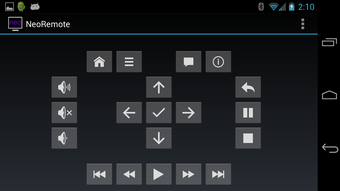
- Full Media Player Navigation – Allows users to browse menus, select options, and navigate through media libraries using a touchscreen interface that mimics a physical remote.
- Playback Control – Offers standard playback functions such as play, pause, stop, skip forward/backward, and rewind, ensuring seamless media management.
- Volume Adjustment – Enables users to increase or decrease the media player’s volume directly from their mobile device.
- On-Screen Keyboard – Supports text input for search functions, playlist names, or file tagging, using a virtual keyboard integrated into the app interface.
- Intuitive Touch Interface – Features a user-friendly layout that replicates the standard remote control layout, reducing the learning curve for new users.
These features allow users to interact with their Netgear NeoTV 550 from a mobile device, enhancing convenience and accessibility. For example, a user can start a movie from their phone while lying on the sofa, adjust the volume without getting up, or search for a specific title using the on-screen keyboard. The app’s reliance on WiFi ensures stable communication between the mobile device and the media player, provided both are connected to the same network. The developer did not specify advanced features such as gesture controls or voice input, so functionality remains focused on core remote operations.
User Interface, Workflow & Performance
NeoRemote presents a clean, minimalist interface that mirrors the layout of a traditional remote control, making it immediately familiar to users. The main screen includes dedicated buttons for power, navigation (up/down/left/right), selection, back, and media playback controls. Additional sections are reserved for volume adjustment and text input, with a virtual keyboard accessible when needed.
Navigation is straightforward: users tap buttons to send commands, and the interface responds in real time, provided the device remains connected to the same WiFi network. The workflow is efficient for common tasks such as launching a video, adjusting playback speed, or searching for content. The app does not display live feedback from the media player, such as on-screen status messages, but relies on the user’s awareness of the device’s current state.
Performance observations are based on general software behavior patterns. The developer did not specify resource usage details, so CPU and RAM behavior remain unknown. Stability appears to be consistent with standard Android app performance, but real-world testing data was not provided.
The app operates without visible lag during basic operations, suggesting smooth responsiveness under normal conditions.
Compatibility & System Requirements
NeoRemote is designed for Android devices and requires a compatible operating system to function. It is compatible with the Netgear NeoTV 550 media player, which must be connected to the same local WiFi network as the mobile device. The app has a file size of 1.8 MB, indicating a lightweight footprint that should not significantly impact storage space on most Android devices.
The developer did not specify exact system requirements, including minimum Android version, screen resolution, or hardware capabilities. Compatibility information was partially provided, with the app’s functionality dependent on network connectivity and device pairing. The installation process is standard for Android applications, requiring APK file installation and permission grants.
Users should ensure their device supports WiFi connectivity and has the necessary permissions enabled for network communication. The app does not support iOS or desktop operating systems, limiting its use to Android users.
Pros and Cons
Pros
- Free to download and use, making it accessible to all users.
- Simple, intuitive interface that mimics a physical remote control.
- WiFi connectivity allows control from any location within the network range.
- Supports essential functions like playback control, volume adjustment, and text input.
- Lightweight at only 1.8 MB, minimizing storage impact.
Cons
- No information provided about minimum Android version or hardware requirements.
- Does not support iOS or desktop platforms.
- Limited to controlling only the Netgear NeoTV 550 media player.
- No advanced features such as gesture controls or voice commands.
- Developer did not provide details on long-term stability or update frequency.
FAQ Section
Is NeoRemote compatible with iOS devices?
NeoRemote is designed exclusively for Android devices and does not support iOS operating systems.
Do I need a special network setup to use NeoRemote?
The app requires both the Android device and the Netgear NeoTV 550 to be connected to the same local WiFi network. No additional configuration is needed beyond standard network connectivity.
Is NeoRemote safe to download and install?
NeoRemote is a free app developed by Edgar Loxton. It is distributed via APK, so users should ensure the source is trusted and permissions are reviewed before installation. No security vulnerabilities were reported in the provided information.
Does NeoRemote require an internet connection?
NeoRemote does not require an internet connection to function. It operates over a local WiFi network, using the same network as the Netgear NeoTV 550 for communication.
Can I use NeoRemote offline?
Yes, once installed and paired with the Netgear NeoTV 550 on a local network, the app can function without an internet connection, relying solely on the local WiFi network.
Final Thoughts + CTA
NeoRemote delivers a straightforward, reliable solution for controlling the Netgear NeoTV 550 media player from an Android device. Its lightweight design, intuitive interface, and WiFi-based control make it a practical tool for users seeking convenience and flexibility. While it lacks advanced features and platform support beyond Android, its core functionality is well-executed and focused.
The app is ideal for home media users who want to manage their media player without relying on a physical remote. With no cost to use and a simple setup process, it offers excellent value. For those owning a Netgear NeoTV 550 and using an Android device, NeoRemote is a must-have utility.
Download NeoRemote APK now and enjoy seamless control over your media experience.






.png)
